GSP662 - Host a Web App on Google Cloud Using Compute Engine
在這個 Lab 裡,會學到如何用 Compute Engine 來部署一個範例電商網站 Fancy Store。
Compute Engine 提供精細的基礎架構控制,雖然比 App Engine 或 GKE 多一些維運成本,但也能帶來 自動修復 (autohealing)、自動擴展 (autoscaling)、負載平衡 (load balancing)、滾動更新 (rolling updates) 等彈性功能。
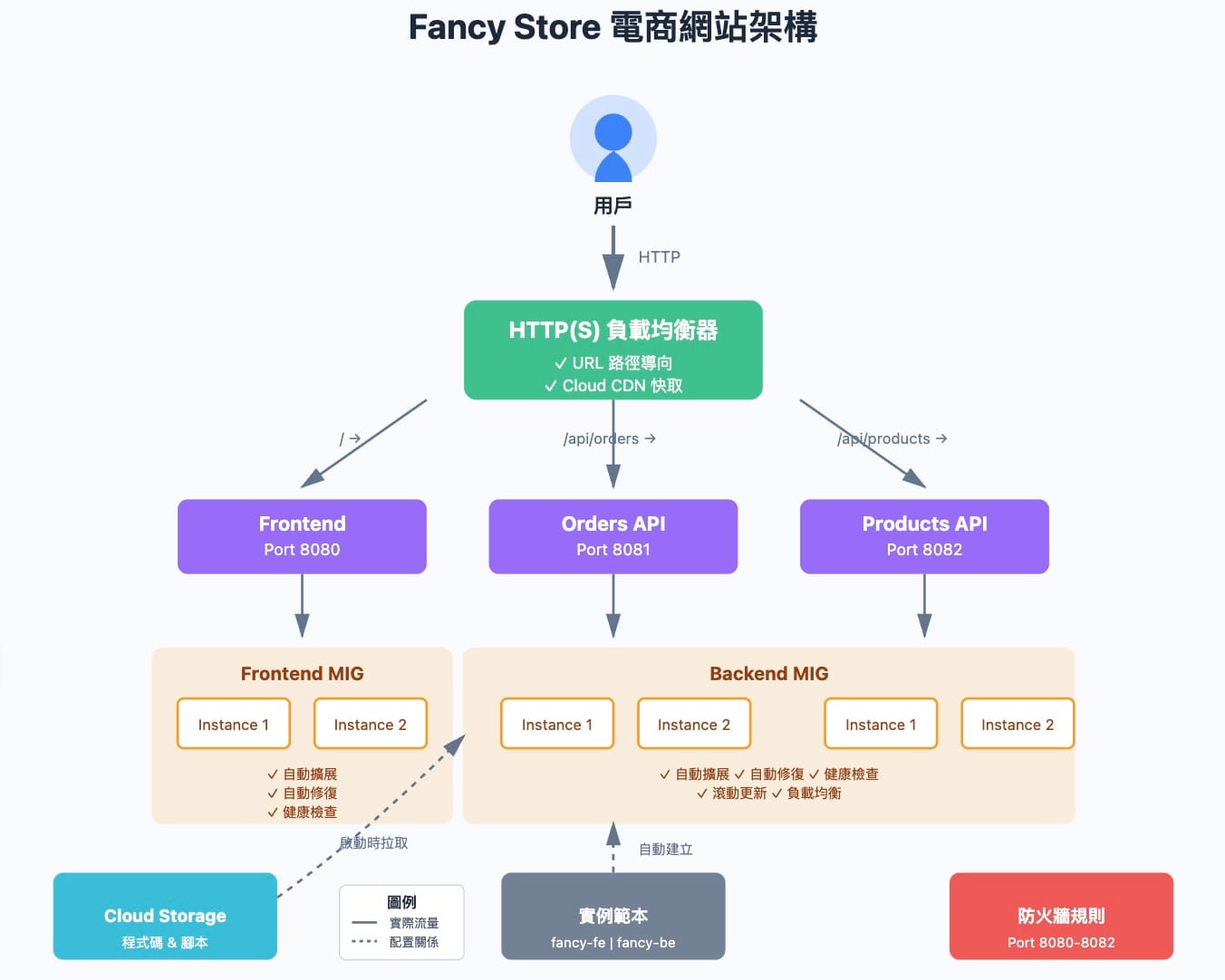
Lab 實作
➊ 建立 Compute Engine 虛擬機 (VM)
學習如何在雲端建立並啟動虛擬主機來運行應用程式。
➋ 建立 Instance Template 與 Managed Instance Group
使用範本統一設定 VM 的環境,並透過群組實現自動化部署與管理。
➌ 設定健康檢查 (Health Checks)
建立健康檢查機制,以便 Load Balancer 能自動偵測並移除不健康的 VM。
➍ 建立 HTTP(S) 平衡負載與 CDN
設定全球性負載平衡器分配流量,並透過 CDN 加速靜態內容的傳遞
➎ 設定自動擴展 (Autoscaling)
根據流量或資源使用率,讓執行個體群組自動增加或減少 VM 數量,提升效能與成本效率
🧠 追蹤我,後續會繼續分享參加計劃的心得和資源!
實作影片
指令整理
Task 1. 啟用 Compute Engine API
啟用 API
gcloud services enable compute.googleapis.com
Task 2. 建立 Storage Bucket
建立儲存桶 (替換 Project ID)
gsutil mb gs://fancy-store-[PROJECT_ID]
Task 3. Clone 原始碼並測試
git clone https://github.com/googlecodelabs/monolith-to-microservices.git
cd ~/monolith-to-microservices
./setup.sh
nvm install --lts
cd microservices
npm start
Task 6. 建立 Load Balancer 與 Health Checks
建立健康檢查
gcloud compute http-health-checks create fancy-fe-frontend-hc --request-path / --port 8080
gcloud compute http-health-checks create fancy-be-orders-hc --request-path /api/orders --port 8081
gcloud compute http-health-checks create fancy-be-products-hc --request-path /api/products --port 8082
建立 Backend Services
gcloud compute backend-services create fancy-fe-frontend --http-health-checks fancy-fe-frontend-hc --port-name frontend --global
gcloud compute backend-services create fancy-be-orders --http-health-checks fancy-be-orders-hc --port-name orders --global
gcloud compute backend-services create fancy-be-products --http-health-checks fancy-be-products-hc --port-name products --global
新增 URL Map 與 Proxy
gcloud compute url-maps create fancy-map --default-service fancy-fe-frontend
gcloud compute url-maps add-path-matcher fancy-map --default-service fancy-fe-frontend \
--path-matcher-name orders \
--path-rules "/api/orders=fancy-be-orders,/api/products=fancy-be-products"
gcloud compute target-http-proxies create fancy-proxy --url-map fancy-map
gcloud compute forwarding-rules create fancy-http-rule --global --target-http-proxy fancy-proxy --ports 80
Task 6-2. 更新前端設定並重啟
更新 .env 並重新 build
cd ~/monolith-to-microservices/react-app
npm install && npm run-script build
gsutil -m cp -r ~/monolith-to-microservices gs://fancy-store-[PROJECT_ID]/
滾動重啟前端 MIG
gcloud compute instance-groups managed rolling-action replace fancy-fe-mig --zone=[ZONE] --max-unavailable 100%
Task 7. 驗證服務健康狀態
檢查後端服務健康
watch -n 2 gcloud compute backend-services get-health fancy-fe-frontend --global
查看 Load Balancer IP
gcloud compute forwarding-rules list --global